
Paymentico is a payment processor, so the name on your statement belongs to the company that moved the money, not the website that sold you something. A third party statement directory says the sites behind it are mostly adult and live entertainment platforms, and the descriptor hides the site name on purpose. No public list matches a charge to a site, so you have to work it out from your own records. This guide shows how, and what to do if the charge is not yours.
Quick answer
- Paymentico is described as a Cyprus based high risk payment gateway owned by Technius Ltd
- It bills for third party sites, mainly adult and live entertainment, so the site name is not on your statement
- Statement descriptors start with UPG and end with the processor’s domain
- A receipt from [email protected] should name the website and the product
- Free trials that convert to paid plans and token packs are two common causes of surprise charges
- If support cannot explain the charge, your bank can dispute it
Most of the detail below comes from a third party directory and user reports. The directory rates its own match at 80 percent confidence, so confirm anything important with the processor’s help center.
Why there is no list of websites
People search for a list because the question feels simple: which sites charge me through this company? But a processor does not publish its merchants, and this one reportedly keeps the website name off the statement for privacy. Any page that hands you a neat list of sites is guessing.
So skip the hunt for a master list. Your own email, browser history and card records are a much better source than anything on the open web.
What the charge looks like
The directory lists several raw descriptors for this processor. Banks and card apps display them in slightly different ways.
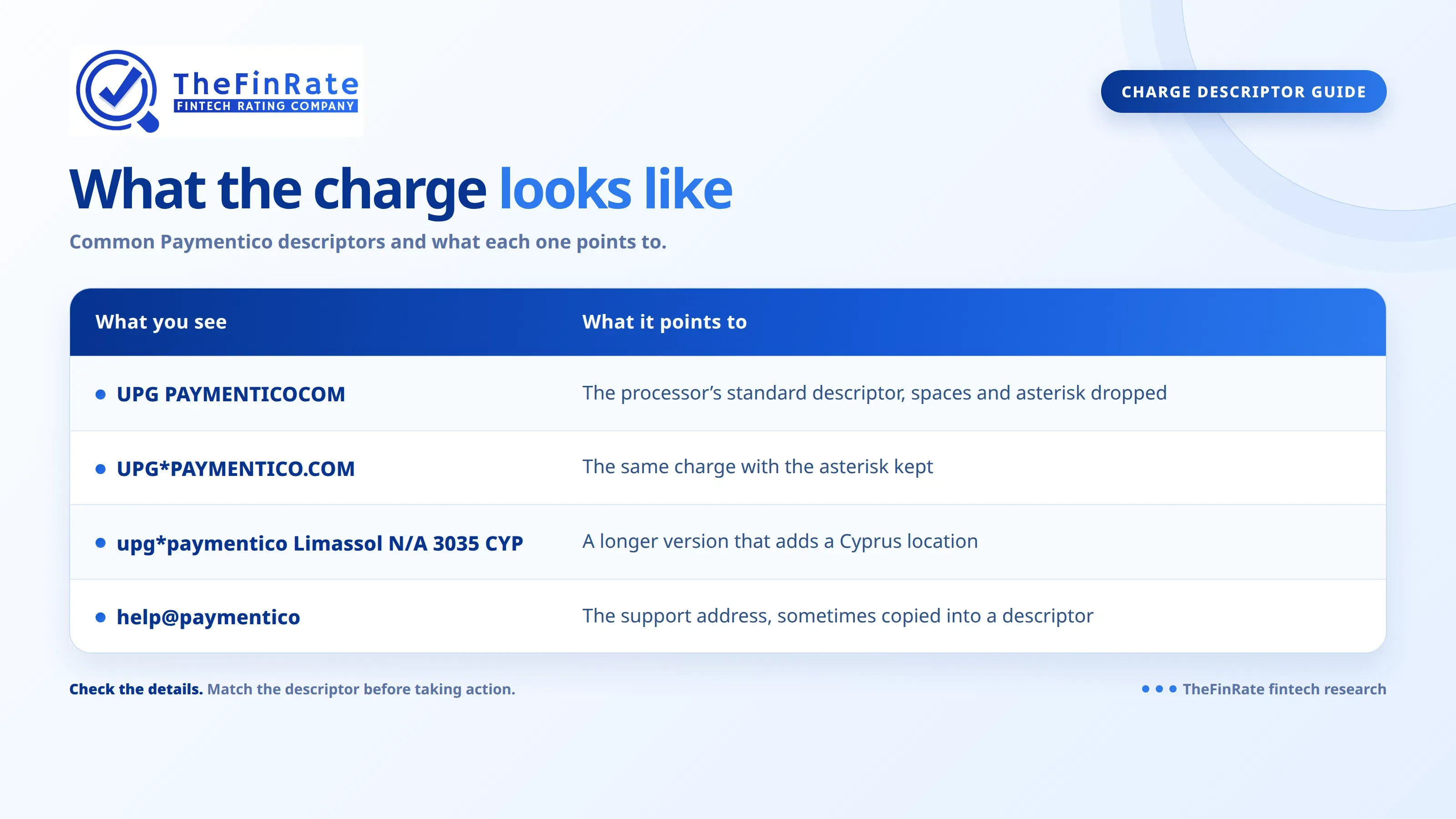
Amounts depend on the site, because the website sets its own prices. Reported charges include $9.99, $19.99, $20.99 and $49.99. Several small charges in one month usually mean you bought more than one token pack.
One more warning about banking apps. A Monzo community thread complains that this processor’s payments have shown up under the wrong merchant name, first as Apple.com and later as H&M. A friendly logo in your app proves nothing, so read the raw descriptor instead.
How to find which website charged you
Start with email, because that is where the answer usually sits.
- Search your inbox and spam folder for the sender [email protected]. Receipts from that address should list the website and what you bought.
- Check your browser history around the charge date. Look for sign ups, free trial offers and token purchases.
- Ask anyone else who has used your card or a saved payment method. A family member or a shared device explains more of these charges than people expect.
- Contact the processor’s billing support through help.paymentico.com, by email at [email protected], or by phone on 1 855 877 7020 (US and Canada) or +44 1344 586020 (international). Lines run on weekday business hours, UTC.
Have the charge date and amount ready. The directory says support asks for one of these: your username on the website, a transaction number from a receipt, or the first six and last four digits of the card.
If you paid for tokens and nothing arrived, wait about 30 minutes first, since delivery can lag. After that, the website’s own support is the right place to ask, because the processor only handles the payment.
Cancelling and disputing
To stop a membership billed through Paymentico, tell the processor’s support team and give them the identifying details above. According to the directory, a cancelled membership typically stays active until the end of the current billing cycle, and later renewals should stop.
If the charge is not yours, do two things on the same day. Report it to the processor so it can investigate, and tell your bank so it can block the card and open a dispute. Some cardholders reported many small recurring charges over several months before they noticed, so scroll back through older statements too. Dispute windows differ by bank, so check yours rather than assuming you have plenty of time.
Charges from sites in this corner of the market can also come from sellers that cut corners. Our guide to fake payment processors and their red flags explains what to look for, and our list of high risk merchant accounts in the USA shows how legitimate providers in this space operate.
Common mistakes
- Disputing the charge before searching your email for the receipt
- Assuming fraud when a free trial simply converted to a paid plan
- Ignoring small repeat charges because each one looks harmless
- Trusting the merchant name or logo your banking app shows
- Contacting the processor about tokens that never arrived, when the website owes you delivery
Verdict
A line like this on your statement almost always means a website you or someone with your card used, billed through a processor that keeps the site name private. The fastest route is the receipt email, then support, then your bank if the answers do not add up. Check your last three months of statements today, and search your inbox for the processor’s support address before you pick up the phone.
Ready to compare more options? Browse TheFinRate’s payment providers and payment gateway reviews to shortlist the right provider for your business.
FAQ
- What is this UPG charge on my bank statement?
It is a card payment handled by a high risk payment processor on behalf of another website. The website itself is usually not named. Your receipt email or the processor’s support team can tell you which site it was.
- Is the charge a scam?
Not automatically. The directory describes a working processor that bills for adult and live entertainment sites. That does not mean every charge is authorized, so confirm it against your own sign ups and report anything you do not recognize.
- Which websites use Paymentico?
There is no public list, and the statement does not name the site. Use the receipt email, your browser history and the processor’s billing support to identify the one that charged you.
- Why was I charged after a free trial?
Many sites on this processor offer trials that turn into paid subscriptions unless you cancel first. The first full fee is taken on the day the trial ends, and the statement shows the processor, not the site you signed up with.
- How do I stop recurring charges?
Contact billing support with your username, a transaction number or the first six and last four digits of your card. Ask them to cancel the subscription and confirm in writing that renewals have stopped.
- Can I get a refund?
Ask the processor and the website first, and keep every message. If neither fixes it and you did not authorize the charge, ask your bank to open a dispute.
Comments
No comments yet. Be the first to share your thoughts.
Leave a comment